











The Canon MAXIFY GX 7040 is redefining business printing with its advanced technology and user-friendly features. Designed for efficiency and high-volume performance, this printer seamlessly blends into any office environment. Whether you run a small business or manage a large corporation, the Canon MAXIFY GX 7040 impresses with its versatility and reliability.
Key Features of the Canon MAXIFY GX 7040
One of the standout features of the Canon MAXIFY GX 7040 is its printing speed and precision. Boasting up to 24 pages per minute for black and white prints and 15.5 pages per minute for color, this printer dramatically improves workflow efficiency.
The printer's intuitive touch-screen interface ensures ease of use, allowing users to navigate settings and features with minimal effort. This, combined with its robust connectivity options, including Wi-Fi, Ethernet, and mobile printing, makes the MAXIFY GX 7040 an adaptable addition to any work environment.
Unmatched Print Quality
Experience professional-grade print quality with the Canon MAXIFY GX 7040. It delivers crisp text and vibrant color prints, whether for detailed presentations or everyday correspondence. This exceptional quality ensures your documents always make a lasting impression.
Cost-Efficiency and Sustainability
The MAXIFY GX 7040 is engineered with cost-efficiency in mind. The printer uses refillable ink tanks instead of traditional cartridges, greatly reducing the cost per page. Additionally, the high-capacity ink system can handle up to 14,000 color pages or 21,000 black and white pages, minimizing downtime for refills.
Furthermore, its eco-friendly design aligns with sustainable business practices, focusing on reducing waste through long-lasting components and energy-saving options.
Usage Scenarios for the Canon MAXIFY GX 7040
From small offices to bustling corporate departments, the Canon MAXIFY GX 7040 adapts to any professional setting. It supports various paper types and sizes, making it ideal for printing everything from invoices and reports to marketing materials and labels.
With its reliable performance and easy maintenance, the MAXIFY GX 7040 is perfect for environments where consistent high-volume printing is necessary. Its network capabilities also make it a reliable choice for shared office spaces, providing all users with seamless access to its advanced features.
Performance Reliability of the Canon MAXIFY GX 7040
The Canon MAXIFY GX 7040 is built to last with durable components and an unwavering commitment to quality. It provides consistent performance even during the busiest periods, thanks to its robust construction and innovative design that prevents common issues like paper jams.
With its high monthly duty cycle, the MAXIFY GX 7040 is designed to meet the demanding needs of businesses, ensuring you never miss a beat.
Introducing Compatible Replacement Toner Cartridges
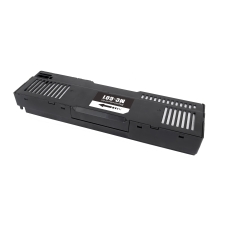
Enhance your printing experience with compatible replacement toner cartridges. These cartridges are designed to work seamlessly with the Canon MAXIFY GX 7040, ensuring that every print delivers the same high-quality results.
Our offering includes cartridges compatible with original toner types, providing an affordable and reliable alternative without compromising on performance.
Advantages of Compatible Replacement Toner Cartridges
Choosing compatible replacement toner cartridges offers several benefits. Firstly, they are cost-effective, significantly lowering printing expenses. Additionally, they are subject to rigorous quality checks to ensure they perform as efficiently as original cartridges. These cartridges also support Canon's eco-friendly initiative by offering a sustainable option that reduces waste.
Conclusion
The Canon MAXIFY GX 7040 stands out as a powerhouse of efficiency, quality, and versatility. Perfectly suited for various professional environments, its superior capabilities make it an invaluable asset to any business. Paired with compatible replacement toner cartridges, it offers an unmatched printing solution that balances cost, performance, and sustainability.